← Back to Articles
Estimating

Construction estimating in Excel: when it works, when it breaks

May 5, 2026 • 14 min read

Construction estimating in Excel: when it works, when it breaks
Cameron Kelsey Cameron Kelsey

Excel works for construction estimating until the spreadsheet you've built outgrows what Excel can do well. The problems with Excel for construction estimating are real, but they show up at specific points — usually around volume, version control, or BAS time. Here's when Excel breaks first, and what to do about it.

I've built the kind of complex estimating spreadsheets construction companies depend on — first as a business analyst building internal tools and database schemas, then in Dean's residential building business before Core Estimator existed. Most articles on this topic are written by software vendors trying to talk you out of Excel. This one isn't. Excel is a real tool with real strengths. It also has real limits, and you'll find them.

In this article

  1. Does Excel actually work for construction estimating?
  2. What are the real problems with Excel-based estimating?
  3. When does Excel start to break for an Australian residential builder?
  4. Why switching from Excel to software isn't always the right next move
  5. What should you actually look for when you outgrow Excel?
  6. Frequently asked questions
  7. Ready to move beyond Excel?

Does Excel actually work for construction estimating?

Yes — to a point.

For a single-operator builder doing six or fewer quotes a month with simple scope, Excel is genuinely fine. The format is flexible, the file is portable, the cost is zero (or already paid for through Microsoft 365), and the workflow lives in a tool the builder already understands. Most of the actual estimating logic — quantities × rates, prelims, margins — is just arithmetic, and Excel handles arithmetic well.

What Excel handles less well is everything around the arithmetic: version control, supplier price updates, takeoff data flowing in cleanly, audit trail, multi-user safety, format-stable client output. Those are the layers that erode first as work scales.

The honest framing is this: Excel is a calculator with formatting. As long as estimating is mostly calculation, it works. The moment estimating becomes coordination — between trades, between people, between live supplier prices and a quote that has to hold for thirty days — Excel starts to creak.

What are the real problems with Excel-based estimating?

The specific problems tend to cluster in the same places, regardless of who built the sheet.

Version control chaos

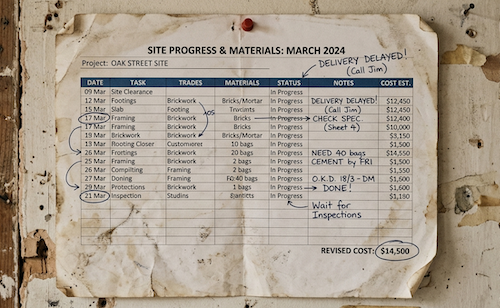
Multiple people open Quote_v3_FINAL_revised_DL.xlsx from email, save changes locally, and there is no source of truth. By Friday afternoon nobody knows whose version is current.

Formula errors that go undetected

A cell reference shifts when someone inserts a row. A SUM range stops at row 47 instead of row 52. The number looks plausible. It goes to the client.

The takeoff-to-estimate handoff

Quantities measured on a PDF or off plans get manually re-typed into the estimate. Every time. There is no link, so when the plans get revised you redo the takeoff and re-type the quantities.

No audit trail

"Who changed this number, when, why?" is a question Excel cannot answer. Track Changes is not designed for the workflow.

Pricing drift

Your supplier prices moved last quarter; your estimate workbook still references the rates from twelve weeks ago. The first time you notice is when the invoice arrives and the margin you priced has quietly disappeared.

Print-formatting headaches

Pages break in the wrong place, columns truncate, numbers shift right by one cell on the printed PDF. The proposal that goes to the client looks like what it is — a spreadsheet.

How these errors compound

None of these are exotic. They are the failure modes anyone who has built and maintained a serious estimating workbook recognises immediately. They also compound — fixed-price risks compound when you're estimating in spreadsheets, because every undetected error becomes a contractual exposure the moment the quote is signed.

When does Excel start to break for an Australian residential builder?

A few thresholds tend to map to the moment Excel goes from "fine" to "actively expensive."

Volume threshold

Roughly six to eight quotes a month. Below that, manual workflow is sustainable. Above that, the rework and reconciliation overhead compounds.

Project complexity threshold

When scope spans more than three trades, the inter-trade dependencies start to matter. Plumbing rough-in affects framing. Framing affects roofing. Excel tracks the numbers, not the dependencies.

Team threshold

When more than one person touches estimates — owner-builder plus an admin, owner plus a junior estimator, or two estimators dividing work — the version control problem stops being theoretical. It becomes a Friday afternoon argument.

The first variation argument that exposes a missing line item

This is the trigger that changes minds. The client points at the contract, asks why the work wasn't in the original quote, and you have no good answer because the line item was dropped during a copy-paste from a previous job. Once that conversation has happened, "Excel works fine" stops being a defensible position.

The pattern across the industry

The Housing Industry Association's adoption surveys consistently show residential builders sitting at the lower end of construction-tech adoption, and the Productivity Commission's reporting on construction sector productivity has been making the same point for years: the gap isn't capability, it's tooling. Most builders who outgrow Excel knew the limits well before they switched. They waited for a specific incident to force the issue.

Why switching from Excel to software isn't always the right next move

This is the part most vendor blogs won't write. Switching too early is its own problem.

The hidden cost of switching includes setup time, learning curve, data migration from the old workbook structure, retraining anyone who touches the estimating workflow, and the productivity dip during the first few jobs on the new tool. For a single-operator builder doing five quotes a month, that cost can easily exceed the marginal pain Excel is causing.

There are real cases where a better Excel template fixes the problem for another twelve to eighteen months. If your specific failure mode is print formatting, a properly built template with locked print areas and tested page breaks solves it. If your failure mode is GST splits, named ranges and explicit GST formulas with input validation will catch most of the errors. If your failure mode is takeoff handoff, a takeoff tab with structured columns and protected formulas reduces the error rate substantially. None of these fix the underlying limits, but they postpone the switch — and for some builders, postponement is the right call.

The wrong reasons to switch are also worth naming: vendor pressure, FOMO from a peer builder, the inertia of an in-progress sales call, or a marketing email landing on a bad day. None of those are signals about your business. They're signals about someone else's quota.

The right reasons to switch are specific: a variation argument that exposed a missing line item; more than one person regularly touching estimates; supplier prices materially out of date in your sheet; BAS reconciliation taking longer than writing the quote did; or outgrowing the format itself, not just the template. Wait for one of those. Don't switch on vibes.

What should you actually look for when you outgrow Excel?

Once you've decided the format itself is the constraint, the next decision is the trap most builders walk into.

The trap is switching to dedicated estimating software while still running a separate tool for budgeting and a third tool for proposals or client communication. Two SaaS subscriptions to do what should be one job — sometimes three. The bill arrives monthly, the data lives in different places, and the integration tax is paid by you, manually, every time a number needs to flow between systems. That isn't a software upgrade. That's just Excel-with-extra-steps and an invoice attached.

What to actually look for:

Estimating, integrated budgeting, and proposals in one place

The estimate flows into the budget. The estimate flows into the proposal. You do not pay two vendors to do that.

A native takeoff workflow

PDF takeoff for most residential work, 3D takeoff (IFC/RVT) if you're working with architects who supply BIM files. Manually re-typing quantities is the problem; the answer can't reintroduce it.

AU compliance built in

GST handling, ABN, claim and retention tracking, BAS-aligned reporting. If the software was built for US contractors and bolted on AU support, you'll find the seams at the worst time.

Format-stable client output

A web proposal or properly-rendered PDF that reflects how your business presents itself, not a spreadsheet pasted into a template. The next layer of the same problem is presenting a quote properly once the underlying number is right.

Audit trail on numbers

Versioning, change history, and the ability to answer "who changed this, when, why" without forensics.

Questions to ask any vendor

Does it cover estimating, budgeting, and proposals end-to-end, or just one of those? Is it AU-built or AU-bolted-on? What does the data look like if I export it tomorrow? If the answers are vague, the software is the problem you'll inherit, not the one you're solving.

Frequently asked questions

What are the biggest problems with using Excel for construction estimating?

Version control chaos, formula errors that go undetected, no audit trail, takeoff-to-estimate handoff that has to be redone every time, GST split errors that surface at BAS time, and print-formatting headaches before client meetings. Excel is fine for a single-builder, low-volume operation. It breaks when complexity or volume increases.

Is Excel still good for construction estimating in 2026?

Excel works for builders doing fewer than six to eight quotes a month with simple scope. Past that volume or complexity, the tracking, version control, and integration gaps start costing more than dedicated estimating software does. Honest answer: it's not "Excel is bad" — it's "Excel has limits, and you'll find them."

When should I switch from Excel to construction estimating software?

When you've had a variation argument that exposed a missing line item, when more than one person is touching estimates, when supplier prices changed and your spreadsheet didn't, or when BAS reconciliation took longer than the quote did to write. Those are the trigger moments.

What's the difference between using Excel and using construction estimating software?

Excel is flexible but manual — you do the work of tracking, version control, takeoff linking, and supplier price updates yourself. Estimating software automates those layers. The trade-off is learning curve and subscription cost versus hours saved and errors prevented.

Can I just use a better Excel template instead of switching?

For some builders, yes. A well-built Excel template with clear formulas, GST handling, and a structured takeoff section will postpone the switch by twelve to eighteen months. For others, the format itself is the constraint and no template fixes it.

What's the most expensive Excel mistake in construction estimating?

GST split errors hidden in formula cells. They don't show up until BAS time, by which point you've already invoiced wrong and the conversation with your accountant is uncomfortable. A close second: missing line items exposed at variation, where the client has every right to ask why it wasn't in the original quote.

Why do builders stick with Excel when they know it has limits?

Inertia, switching cost (real and perceived), and the fact that Excel is effectively free. Most builders know Excel has limits — they just haven't reached the breaking point hard enough to justify the change yet.

Ready to move beyond Excel?

If you've reached the point where Excel is costing more than it's saving, see how an estimate flows in dedicated software.

Keep reading

Cameron Kelsey

Written by Cameron Kelsey

Cameron co-founded Core Estimator and leads software development on the platform. He has previously spent time working inside a construction business, so not only does he understand the tech he also understands the industry.

Subscribe To
Our Newsletter

Receive expert estimating advice, takeoff strategies, and bidding guides every week.

Recent Posts